
• Link to Facebook
  • Link to LinkedIn
  • Link to Mail
  • Join eMail List
OnMerit Marketing
  • Home
  • Projects
  • Services
    • Website Design
    • Workplace Design
    • Print Design
  • Marketing Services
    • eMail Marketing
    • Content Marketing and Copywriting
    • Social Media Marketing
  • Blog
  • Schedule Consultation
  • Menu Menu

Got a great video with a GREATER file size?
Here’s a quick hack to get it down to size quickly.

If you are a marketer like me, you often find yourself creating, or receiving video content from your clients. It’s a big part of marketing and brandwatch research shows US adults spend an average of 1 hour, 16 minutes each day watching video on digital devices. Video adds a unique aspect to marketing, but large file sizes can create serious road blocks when you’re out in the field.

We have all experienced that moment during a client meeting or sales presentation where no one knows the Wifi password, or the connection is slow and the video starts buffering during your pitch.

Large file sizes are not a problem if you have a good internet connection, but connectivity can be unpredictable outside of your office, so be prepared…because “the show must go on!”

These problems can be eliminated with smaller video sizes and by placing them directly in your presentation software for stress free access and smooth playing on your device.

Here’s 4 quick steps to use YouTube to create a smaller video size.

If the original video is not already uploaded to YouTube.com, do that first.
Here’s a quick how-to video.

  1. Log-in to your YouTube Account
  2. Choose My Channel from menu in upper left hand corner
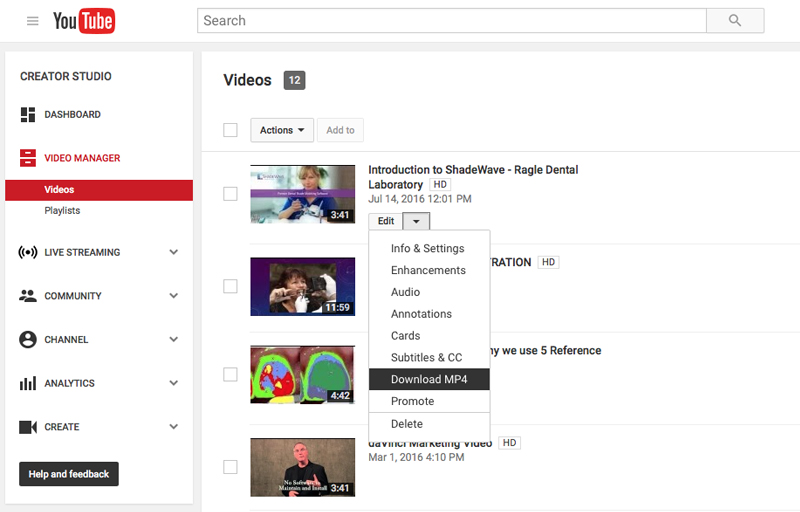
  3. Click on Video Manager, just under search bar, to view all of your uploaded videos
  4. Choose the video and Click Edit from Drop Down and choose Download MP4

Downloading the video following these steps allowed me to resize a 200mb to approximately 3.7mb in about 5-10 seconds.

Now I can easily place and play the video in (a variety of places):

  • Adobe Acrobat PDF Document
  • Microsoft Powerpoint or Apple Keynote presentation
  • Upload directly into Facebook and get up to 7X distribution
  • Easily share and view from Dropbox
  • Use as an attachment in eMails
  • Upload to a website (some have 50mb max files sizes)

I hope this quick tip helps you. Also, you can read the full brandwatch article: Marketing: 96 Amazing Social Media Statistics and Facts for 2016

Gary Thompson
Owner, OnMerit Marketing

About the Author

Gary is OnMerit Marketing’s owner and blog writer. A Brand Designer and Internet Marketing Specialist, he has a passion for helping small businesses look great and grow their businesses online. Follow Gary on Twitter @onmerit, or Facebook: www.facebook.com/onmeritmarketing

Pages

  • About us
  • Blog
  • Contact us
  • Content Marketing and Copywriting
  • eMail Marketing
  • Environmental Design
  • Get Your Guide Opt-in Now
  • Home
  • Interactive Experience Design
  • Join eMail List
  • Marketing Services
  • mobile
  • mobilenew
  • Print Design
  • Projects
  • Quick Start Guide Download
  • Responsive Website Design
  • Schedule Consultation
  • Schedule Consultation
  • Services
  • Social Media Marketing
  • Thank you
  • Website Design
  • Workplace Design

Categories

  • Blog
  • Blogging
  • eMail Marketing
  • Interactive
  • Kiosks
  • Local Search
  • Marketing
  • Marketing Automation
  • Responsive Website Design
  • Social Media
  • Strategies
  • Touchscreens
  • Tourism
  • Website Analytics
  • Website Popups
  • Workplace Design

Archive

  • July 2026
  • June 2026
  • February 2026
  • January 2026
  • November 2025
  • October 2025
  • February 2023
  • July 2019
  • January 2019
  • November 2018
  • September 2018
  • August 2018
  • January 2018
  • December 2017
  • July 2017
  • June 2017
  • May 2017
  • September 2016
  • June 2016
  • May 2016
  • April 2016
  • March 2016
  • February 2016
  • December 2015
  • November 2015
© Copyright 2026 - OnMerit Marketing Design by: OnMerit Marketing
  • Link to Facebook
  • Link to LinkedIn
  • Link to Mail
Link to: It’s Time to Make Your Website Responsive Link to: It’s Time to Make Your Website Responsive It’s Time to Make Your Website Responsive Link to: 5 Email Marketing Strategies Your Small Business May Be Missing Link to: 5 Email Marketing Strategies Your Small Business May Be Missing 5 Email Marketing Strategies Your Small Business May Be Missing
Scroll to top Scroll to top Scroll to top

This site uses cookies. By continuing to browse the site, you are agreeing to our use of cookies.

OK

Cookie and Privacy Settings


How we use cookies

We may request cookies to be set on your device. We use cookies to let us know when you visit our websites, how you interact with us, to enrich your user experience, and to customize your relationship with our website.

Click on the different category headings to find out more. You can also change some of your preferences. Note that blocking some types of cookies may impact your experience on our websites and the services we are able to offer.

Essential Website Cookies

These cookies are strictly necessary to provide you with services available through our website and to use some of its features.

Because these cookies are strictly necessary to deliver the website, refusing them will have impact how our site functions. You always can block or delete cookies by changing your browser settings and force blocking all cookies on this website. But this will always prompt you to accept/refuse cookies when revisiting our site.

We fully respect if you want to refuse cookies but to avoid asking you again and again kindly allow us to store a cookie for that. You are free to opt out any time or opt in for other cookies to get a better experience. If you refuse cookies we will remove all set cookies in our domain.

We provide you with a list of stored cookies on your computer in our domain so you can check what we stored. Due to security reasons we are not able to show or modify cookies from other domains. You can check these in your browser security settings.

Google Analytics Cookies

These cookies collect information that is used either in aggregate form to help us understand how our website is being used or how effective our marketing campaigns are, or to help us customize our website and application for you in order to enhance your experience.

If you do not want that we track your visit to our site you can disable tracking in your browser here:

Other external services

We also use different external services like Google Webfonts, Google Maps, and external Video providers. Since these providers may collect personal data like your IP address we allow you to block them here. Please be aware that this might heavily reduce the functionality and appearance of our site. Changes will take effect once you reload the page.

Google Webfont Settings:

Google Map Settings:

Google reCaptcha Settings:

Vimeo and Youtube video embeds:

Other cookies

The following cookies are also needed - You can choose if you want to allow them:

Accept settingsHide notification only