
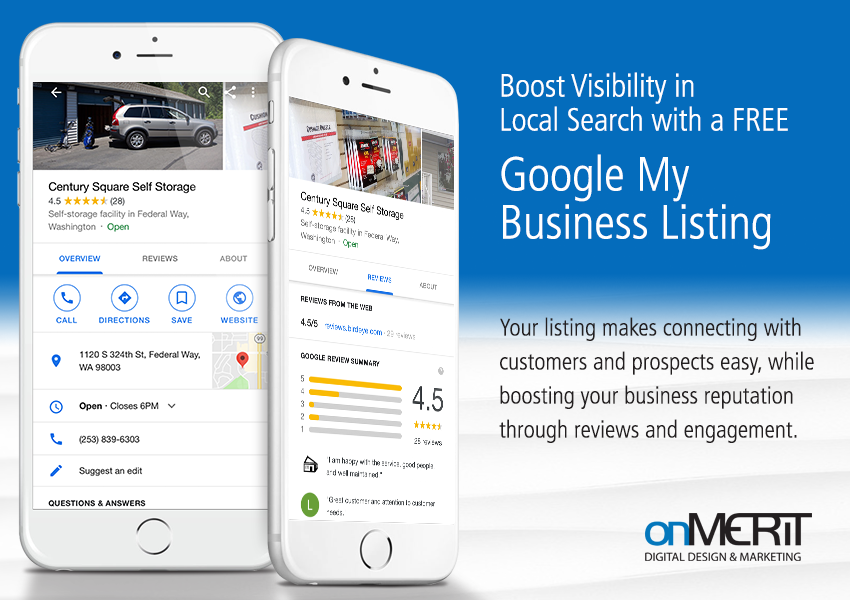
Your Google My Business (GMB) listing can offer a great boost in visibility for your business and improve your local search engine optimization (SEO) efforts. Also, it’s FREE, easy to implement and helps you manage your information accurately across all search engine results!
When users search for your company by name, your GMB info is the first thing displayed on mobile devices, and on desktops, it appears in the sidebar regardless if you’re using Google, Safari, or Firefox. To make the most of marketing opportunities via Google, you want to ensure you fully develop your listing.
There are many aspects to making your listing stand out from the crowd.
Here’s a great video tutorial:
#1. Claim and Verify Your Google My Business Listing
First and foremost, you have to claim your listing before you do anything else. Luckily, it’s a quick and painless process.
You can verify your listing on the Google My Business page. Make sure you’re signed into your Google account and follow the appropriate instructions. If you don’t have a Google Account, you’ll need to create one to get started.
#2. Fully Complete Your Listing
Some of the most important information that you’ll want to make sure is complete and accurate is your business description, hours, and appointment times (if relevant). Google has specific guidelines for you to follow, so be sure to adhere to them.
Due to anyone having the ability to fill out the information for a company by clicking on “Suggest an Edit,” inaccuracies can occur, so don’t be complacent in letting your profile on GMB sit out there without attention from you.
If you’re wondering how you can prevent people from adding or changing your listing — you can’t. What you can do, however, is to keep a watchful eye on it. Set a weekly or monthly task to review the information to ensure it’s filled out completely and accurately.
#3. Tell Your Business’ Story Through Photos
Adding photos offer a way to make your GMB listing stand out — especially as consumers like to see what they’re getting into while researching a company to do business with. Adding photos offer a way to showcase your business. In fact, Google provides recommendations on the type and quantity of photos you want to add to your listing.
Don’t forget that customers can also upload images, so if there’s an opportune time to show your customer-centric self with visitors, take advantage of it.
There are two specific photos that you’ll want to address which have a particular purpose:
Cover Photo
Your cover photo sets the tone for people’s opinion of your business from the first glance. Depending on the type of business you run, you might want a storefront photo, one of your products, or a picture of your team. Consider what you want your first impression to be and what you deem as important to your would-be consumers. Don’t be shy here; let your personality and uniqueness shine through!
Profile Photo
Your profile photo is what people see when you answer questions or upload any photos. Think of it as your business’ online identity.
#4. Tell Everyone What You’re Doing
People love events, so if you’re having one, be sure to create a post about it on your GMB listing so it shows up in your profile.
This is different than just a regular post. For events, set up the “post” with the time and date of the activities. What if registration is required? No worries. You can add a link for people to register online.
Another useful feature is the “sale” event. You can post about products that have a reduced price or if you’re running a store-wide special.
#5. Communicate with Your Community
People have lots of questions when it comes to a new business they’re considering to frequent. The Q&A section is the perfect opportunity for them to get their concerns or specific questions answered.
With most things in your listing, anyone can answer questions — even people who have never been to your business. That’s why it’s important to address these questions as quickly as possible. (Be sure to turn on notifications so you’re notified when a question is asked.)
When you’re logged into your account and answer a question, it will show that it was your business who answered it. This builds a sense of trust because you actually took the time to address the question personally.
#6. Keeping an Eye on Your Profile’s Updates
If you want to see what information has been added to your profile, there’s an easy way to do it. Simply click “Google Updates” when you’re inside your listing. That will apprise you on the activity that’s been happening within your listing.
While Google notifies you by email when there is user-generated information added, sometimes you’ll miss these emails. Your best way to keep up-to-date is to log in to your GMB listing and not rely 100% on email notifications.
#7. Find Out What Your Customers Think
Reviews are an opportunity for your business to shine in a couple of ways.
First, there’s nothing more effective to get people to try your business than other people shouting your praises from the rooftops. That’s human nature; if all these people love your business, it has to be good, right?
Also, it gives you an opportunity to address anything negative someone has to say about your business — and make it right. Sometimes, that’s even better than getting it right the first time.
Overall, when you optimize your Google My Business listing, it can bring a lot of attention to your site via local search. You want to take advantage of all that it has to offer and give your company a leg-up to those who are letting this opportunity pass them by.
Interested in seeing how you can make the most of your Google My Business listing and other Google features?
OnMerit can assist you with your Google My Business Listing, Google Ads, Google Analytics and so much more. Contact us for a consult.

About the Author
Gary is OnMerit Marketing’s owner and blog writer. A Brand Designer and Digital Marketing Specialist, he has a passion for helping small businesses look great and grow their businesses online. Follow Gary on Twitter @onmerit, or Facebook: www.facebook.com/onmeritmarketing

