
17 Proven Ways to Build Your Email Marketing List
When it comes to deciding where to spend your marketing dollars, email marketing offers one of the best returns on investment. But before you start sending out emails, you need a subscriber list to work from.
According to Hubspot, email databases naturally decay at a rate of 22.5% per year. That means that even though you may be in a continual state of adding people to your list, you’re going to lose some subscribers over time.
This is why finding new and creative ways to build your list is essential.
The good news is that there are plenty of low or no cost activities you can implement to build your list. List building doesn’t have to be a costly or time-consuming activity. By employing some simple strategies, you can add new subscribers to keep your list fresh and grow your database.
Here are 17 proven ways to build your email marketing list:
#1. Offer an Opt-in/Create a Lead Magnet
If someone is visiting your website, they’re already showing interest in your business, so now is the time to strike while the iron is hot! You want to entice people to sign up for your list, so offering them something that may be valuable to them, like an e-book or a guide related to your area of expertise, is a great incentive for them to provide their email address.
#2. Add Content Upgrades to Your Blog Posts
Your content upgrade can be a simple PDF that your reader might find valuable, like a checklist or how-to guide that relates to the content of the post. A reader can provide their email address to get access to the content upgrade, and you gain new subscribers in the process.
#3. Host a Webinar
Show everyone your expertise, and share compelling content through a webinar. Offering a training for free increases the perceived value of what you’re offering, and participants can sign up by providing their email address.
#4. Offer Webinar Recording to Those Who Sign up for Your Email List
Not everyone can get to a webinar on a specific date and time, so by offering access after it’s happened, you’re allowing potential customers to still get the benefit of the webinar. In return, they provide their email address, and your list continues to grow.
#5. Add a Call to Action to Your Facebook Posts
Building a community through social media is a proven way to gain more exposure for your business. By including a call to action on your Facebook posts, you can drive more visitors to your website, and promote your opt-in to help get more subscribers.
#6. Install an Exit Pop-up
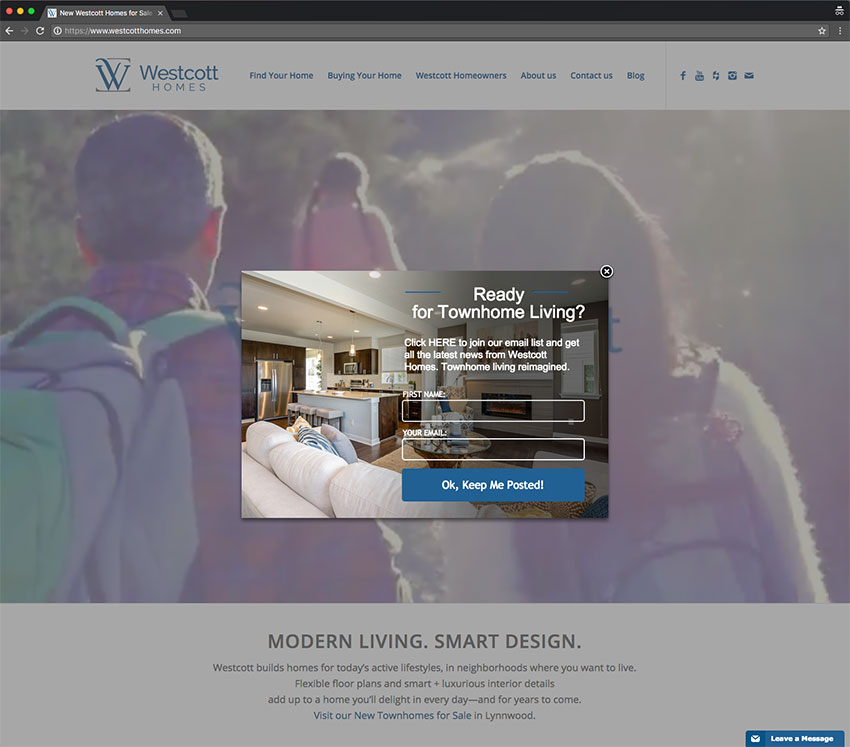
Trying to grab people as they leave your site is a low effort strategy that can capture more email addresses. Your exit pop-up can include the offer to sign up for your lead magnet or one of your content upgrades, or simply ask for their email address as a way to keep in touch.
#7. Use Testimonials on Your Website/Next to Your Opt-In
Social proof is a powerful tool that you can use to your advantage. Let your past and current clients provide a positive recommendation for your products and services, which can help ensure people opt-in as they know you’re knowledgeable and can be trusted.
#8. Add a Call to Action to All of Your Bios
Someone reading your bio or about page already wants to know more about you, so it’s the perfect time to give them a way to continue to stay in touch and keep up to date with your business. You can simply include a link to your opt-in as the final line of your bio.
#9. Include Social Sharing Buttons on Your Blog Content
Let your existing readers promote your content! These are people who are already following you and presumably value what you do. Make it as easy as possible for your readers to share your content on social media platforms so that you can get exposure to more potential customers and draw more people to your website.
#10. Add a Call to Action Button to the Top of Your Facebook Business Page
When people are looking for information on your business, they often look to social media for reviews and other information. Take advantage of these visits by including a call to action button on your Facebook Business page so people can sign up for your lead magnet.
#11. Have a Sign-up Bar/Box on Every Page of Your Website
When it comes to getting more people to sign up for your email list, easy is the name of the game. You want it to be simple and accessible, so ensuring there’s a sign-up bar or box on every single page of your website means they can sign up quickly and easily whenever they decide to.
#12. Send a Weekly or Monthly Newsletter
Creating a weekly or monthly newsletter can bring you subscribers in two ways. People who want updates on your business and are looking for upcoming events, sales, or possible discounts have a way they can hear from you on an ongoing basis. People who are already subscribed and are receiving the newsletter can also forward it to people in their network who maybe interested in your content and in turn, those people can then become subscribers.
#13. Offer a Subscriber Only Discount
Offering a discount to subscribers is a great way to sweeten the pot, and people love feeling like they’re part of something exclusive. You can promote that you are offering something via subscriber-only access to help draw in some new subscribers. (This is a common tactic that online retailers use that you can adapt to help grow your email list.)
#14. Attend Networking Events
One of the best ways to get your business on people’s radars is to get out and be seen. Attend an industry event or something with your local chamber of commerce. Hand out business cards and encourage people to visit your site, and learn more about your business. The more website visitors you have, the more likely you are to add new subscribers.
#15. Collect Email Addresses at Offline Events
Whether it’s a trade show or a conference, offline events are a great place to connect with people and get their emails. Ask them if they’d be interested in keeping in touch or hearing from you again, and have them provide their email address so you can send them your newsletter.
#16. Do a Giveaway
We all know that people love free stuff, so offering something a little extra special — be it a product or service from your business or just something fun that people might like to have — is a simple strategy to get people to provide their email address. Ensure what you’re offering as a giveaway is aligned with what your business does, so you’re gaining quality subscribers.
#17. Host a Challenge
Holding a challenge for a specific number of days can drum up some interest in your business and get more people interacting with you online. It can be something silly and fun or something more thoughtful and serious, but either way, it should be something that will appeal to your audience. Make it something anyone can participate in so that they’re willing to provide their email address.
The most important thing to remember when trying to build your email list is that it’ll take time. We live in a digital world, so having an active and engaged list is what will help you make the most of your email marketing efforts.

About the Author
Gary is OnMerit Marketing’s owner and blog writer. A Brand Designer and Digital Marketing Specialist, he has a passion for helping small businesses look great and grow their businesses online. Follow Gary on Twitter @onmerit, or Facebook: www.facebook.com/onmeritmarketing

